Pick a colour combination
Open the colour step and choose from the available palette. Watch the corresponding areas of the shirt change.
The working product
Explore a prepared traditional shirt in the Kitory demo. Change the available colours, switch views and try the personalisation controls.
No account needed to explore the public builder. The demo shows sample artwork and configured options.
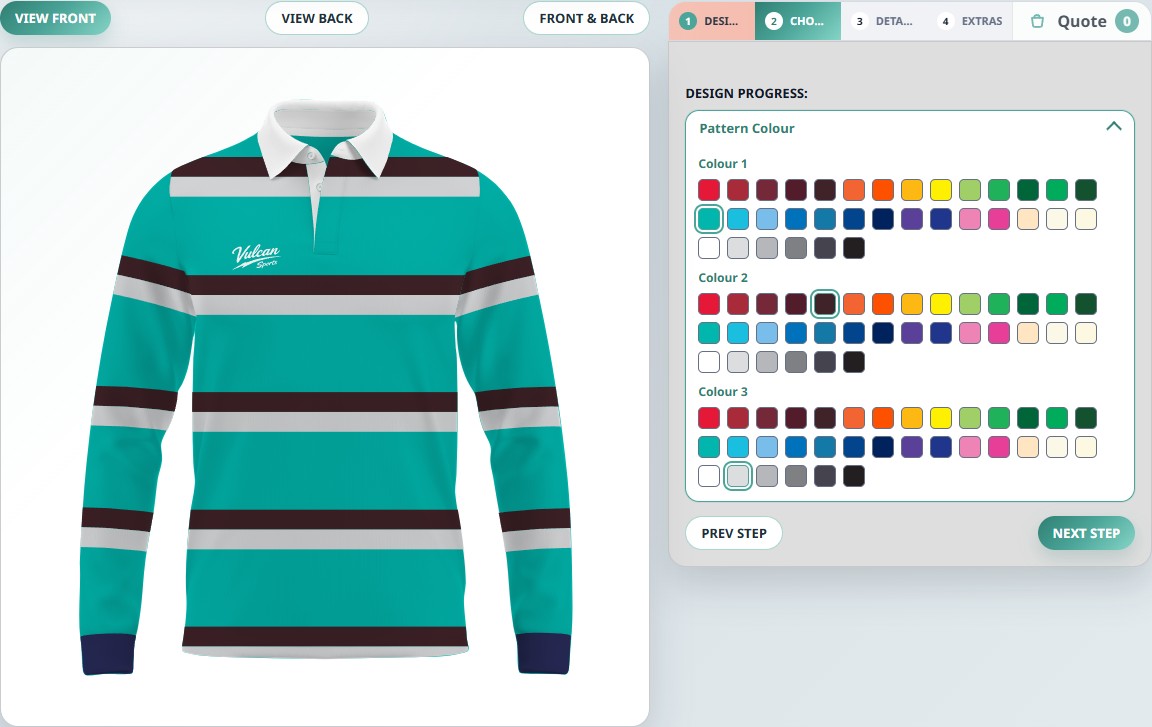
Explore the choices a supplier can make available to their customers.
Open the colour step and choose from the available palette. Watch the corresponding areas of the shirt change.
Switch between front and back. Look at the available extras to see how a supplier can guide personalisation.
The demo is a configured example. Your own garments, artwork and options would be prepared as part of your setup.
This is a product demonstration, not a kit shop. If you explore the quote basket, use it to review the journey; you do not need to submit a quote to try the builder. For software enquiries, get started with Kitory or review the plans.
Your range. Their next kit.
Tell us about your garments, your customers and the way you handle enquiries.